The visible feature was only the surface
Chrome's standard screenshot flow captures only the visible viewport, while many full-page tools add heavy editors, accounts, or cloud upload. 1Snap had to capture and mark one complete image without introducing a remote processing boundary.
The system also had to respect concrete constraints. Chrome can capture only the active visible tab, so the source tab must stay active while 1Snap scrolls and records each frame. Dynamic content, visible images and fonts, fixed or sticky elements, and the user's original scroll position must be stabilized or restored without leaving the page altered. Captures are bounded to 50 frames, 16,000 by 32,000 output dimensions, and 120 million pixels, with proportional downscaling when needed; annotation geometry must stay aligned through responsive editing and original-resolution export.
My role covered product design and browser-extension engineering, with responsibility for capture lifecycle, page stabilization, local image processing, annotation tooling, and release delivery.
I turned the constraints into boundaries
Toolbar-triggered WXT background controller coordinating the active tab and progress; injected page planning that measures, stabilizes, scrolls, and restores document state; capture and annotation records in extension-owned IndexedDB; local Canvas stitching followed by a React result page with an SVG editing overlay and original-resolution export composition.
Store recent frames and assemble the PNG locally rather than uploading page captures, avoiding an account or remote image-processing boundary.
Persist vector geometry separately from the stitched screenshot so users can select, move, resize, undo, redo, or cancel edits before Canvas composition produces the final PNG.
Record and restore scroll position and temporary presentation changes on success or failure so the capture workflow does not leave the source page modified.
Stop or proportionally downscale oversized captures instead of allowing unbounded browser memory and canvas work.
The key decision: Keep capture and stitching inside Chrome.
The implementation had to prove the model
I delivered the work across the full path: Designed the one-click capture, progress, result, annotation, copy, download, and recovery journeys. Implemented document measurement, scroll planning, visible-asset waiting, animation pausing, sticky-element handling, and state restoration. Built IndexedDB frame and annotation retention, local Canvas stitching, SVG editing and history controls, output sizing safeguards, and original-resolution annotated export. Established unit and UI coverage, the public product website, Netlify deployment, and the checksummed Manifest V3 v0.1.1 release.
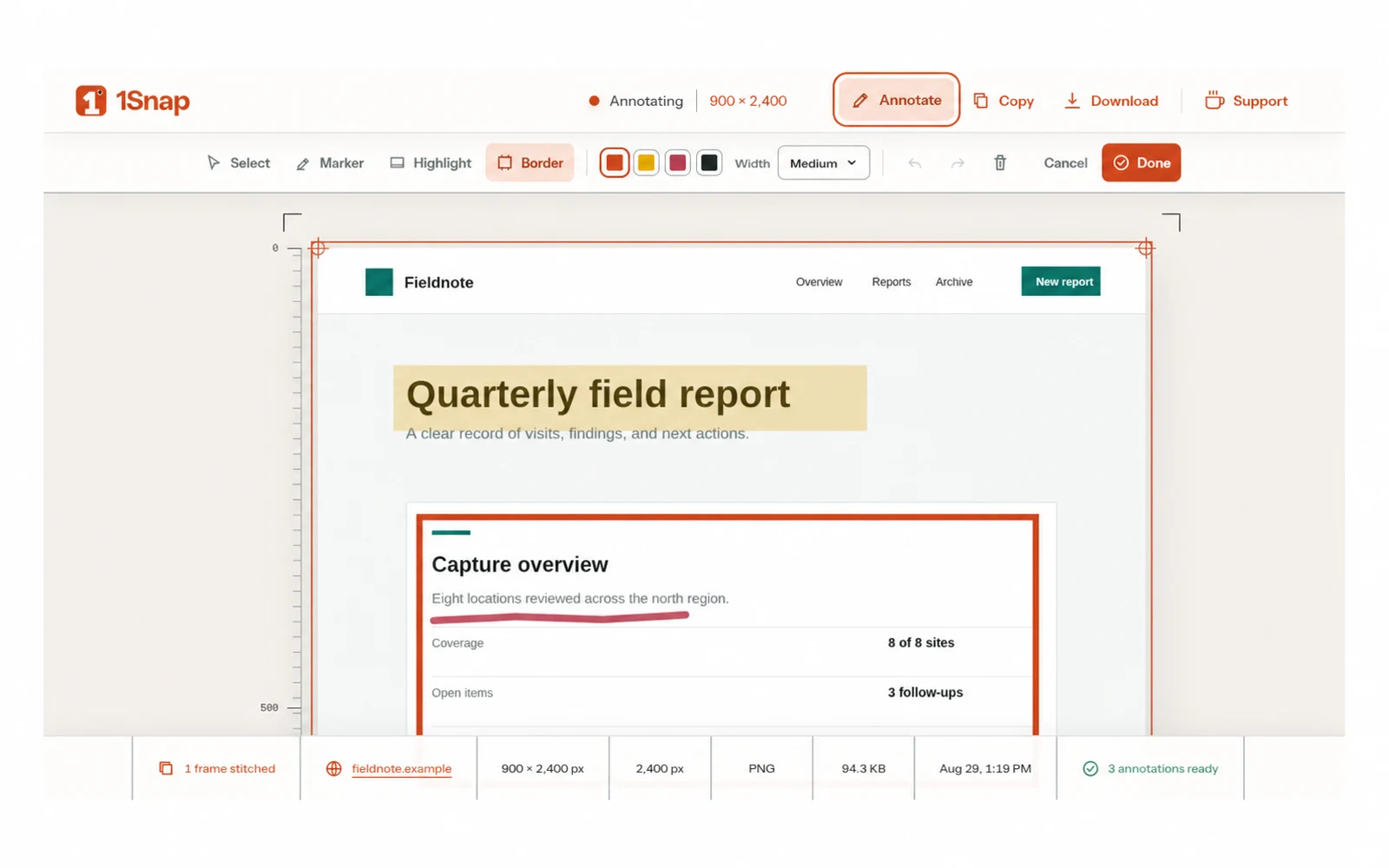
The result is concrete: Users can turn a regular web page into one full-height PNG, then mark details with Marker, Highlight, or Border tools. Capture frames, vector annotations, image assembly, and export composition remain inside extension-owned browser storage and processing. The result page combines measured capture evidence with selection, movement, resizing, color and width controls, undo, redo, clear, copy, and download. Maintainers shipped v0.1.1 as a verified Chrome ZIP with a matching published SHA-256 checksum.
The senior engineering lesson was that solving the visible workflow is only half the job. The architecture must also make constraints, failure modes, evidence, and ownership explicit enough for the next change to remain safe.