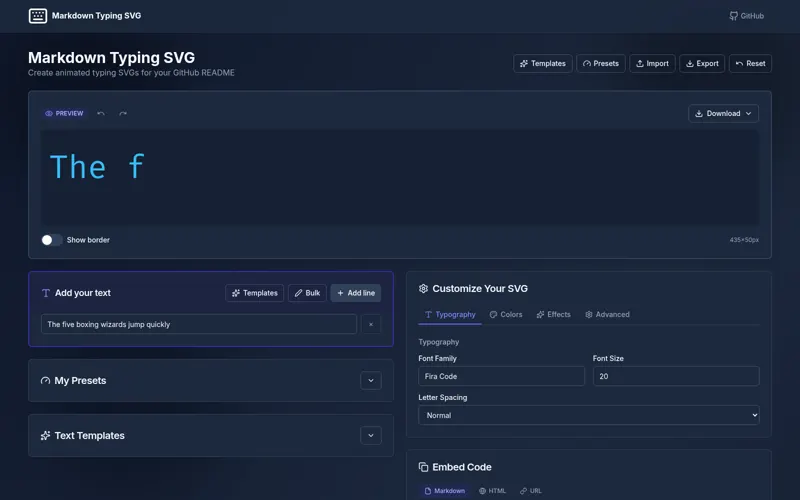
Generator and cacheable API for customizable animated typing SVGs used in GitHub profiles, README files, and websites.
Markdown Typing SVG is a developer tool created to make a real workflow clearer, faster, and easier to trust. It turns a focused product idea into something people can use, evaluate, and understand without needing to inspect the source code.
Why Markdown Typing SVG exists
Creating a customized typing animation for a README normally requires manual SVG/CSS editing and hosting the result.
The goal is not simply to add another tool. Markdown Typing SVG is designed to reduce the friction around that problem and give people a more dependable way to complete the work.
What it delivers
- Users can compose animated text visually.
- Embed it through Markdown, HTML, or an image URL.
- Reproduce designs from query parameters.
- Receive explicit validation behavior without stored generated files.
The experience
Generator and cacheable API for customizable animated typing SVGs used in GitHub profiles, README files, and websites.
The project brings the important parts of the workflow into one coherent experience. Its interface and behavior are shaped around the people using it, while the implementation stays focused on predictable results and honest feedback.
What to know
Every product has boundaries. These are the most important considerations for Markdown Typing SVG:
- Public embeds depend on deployment availability.
- Successful responses cache for 24 hours.
- There is no documented request-rate/abuse-control layer and SVG text must be safely escaped/validated.
These limitations are presented openly so visitors can understand where the project works well, what it depends on, and what may change in future versions.
Current status
Publicly deployed. The current release demonstrates the core value of the project and the main end-to-end experience.
My role was developer-tool design and full-stack engineering, covering developer workflow, api surface, and deployment. The related case study explains the decisions and delivery process in greater depth for visitors who want the engineering story behind the product.