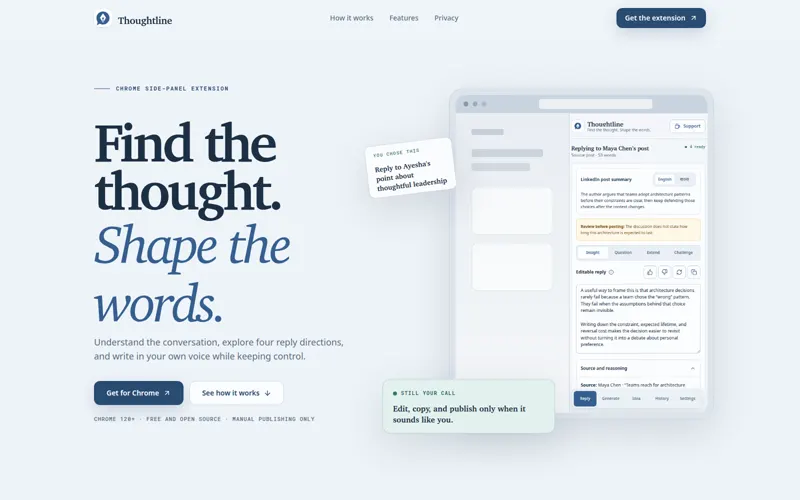
User-controlled Chrome side-panel extension for drafting replies from pasted or selected LinkedIn posts, refining writing, and keeping every publish action manual.
Thoughtline - LinkedIn Writing Assistant is a browser extension created to make a real workflow clearer, faster, and easier to trust. It turns a focused product idea into something people can use, evaluate, and understand without needing to inspect the source code.
Why Thoughtline - LinkedIn Writing Assistant exists
Writing a useful LinkedIn reply or post requires understanding the visible conversation while preserving the author's own voice, intent, and control.
The goal is not simply to add another tool. Thoughtline - LinkedIn Writing Assistant is designed to reduce the friction around that problem and give people a more dependable way to complete the work.
What it delivers
- Users can paste a post or select a visible conversation and draft four reply directions.
- Generate/refine post ideas in configured voice.
- Use a fixed free-only OpenRouter, Gemini, and Groq route under defined fallback rules.
- Export and restore validated configurations and history.
The experience
User-controlled Chrome side-panel extension for drafting replies from pasted or selected LinkedIn posts, refining writing, and keeping every publish action manual.
The project brings the important parts of the workflow into one coherent experience. Its interface and behavior are shaped around the people using it, while the implementation stays focused on predictable results and honest feedback.
What to know
Every product has boundaries. These are the most important considerations for Thoughtline - LinkedIn Writing Assistant:
- LinkedIn page content is untrusted and must be bounded before entering prompts.
- OpenRouter, Gemini, and Groq keys are all required so the fixed free-only route can fall back without asking during a writing task.
- Extension permissions, encrypted local storage, and retention/export behavior must remain understandable to the user.
These limitations are presented openly so visitors can understand where the project works well, what it depends on, and what may change in future versions.
Current status
GitHub release available. The current release demonstrates the core value of the project and the main end-to-end experience.
My role was product design and browser-extension engineering, covering browser integration, provider workflows, and privacy. The related case study explains the decisions and delivery process in greater depth for visitors who want the engineering story behind the product.